QUI Documentation
A modular World of Warcraft UI suite for Midnight 12.1+ that you can install, understand, and tune from one settings experience.
Current Release: 5.2.3
Get Started Explore Features View on GitHub
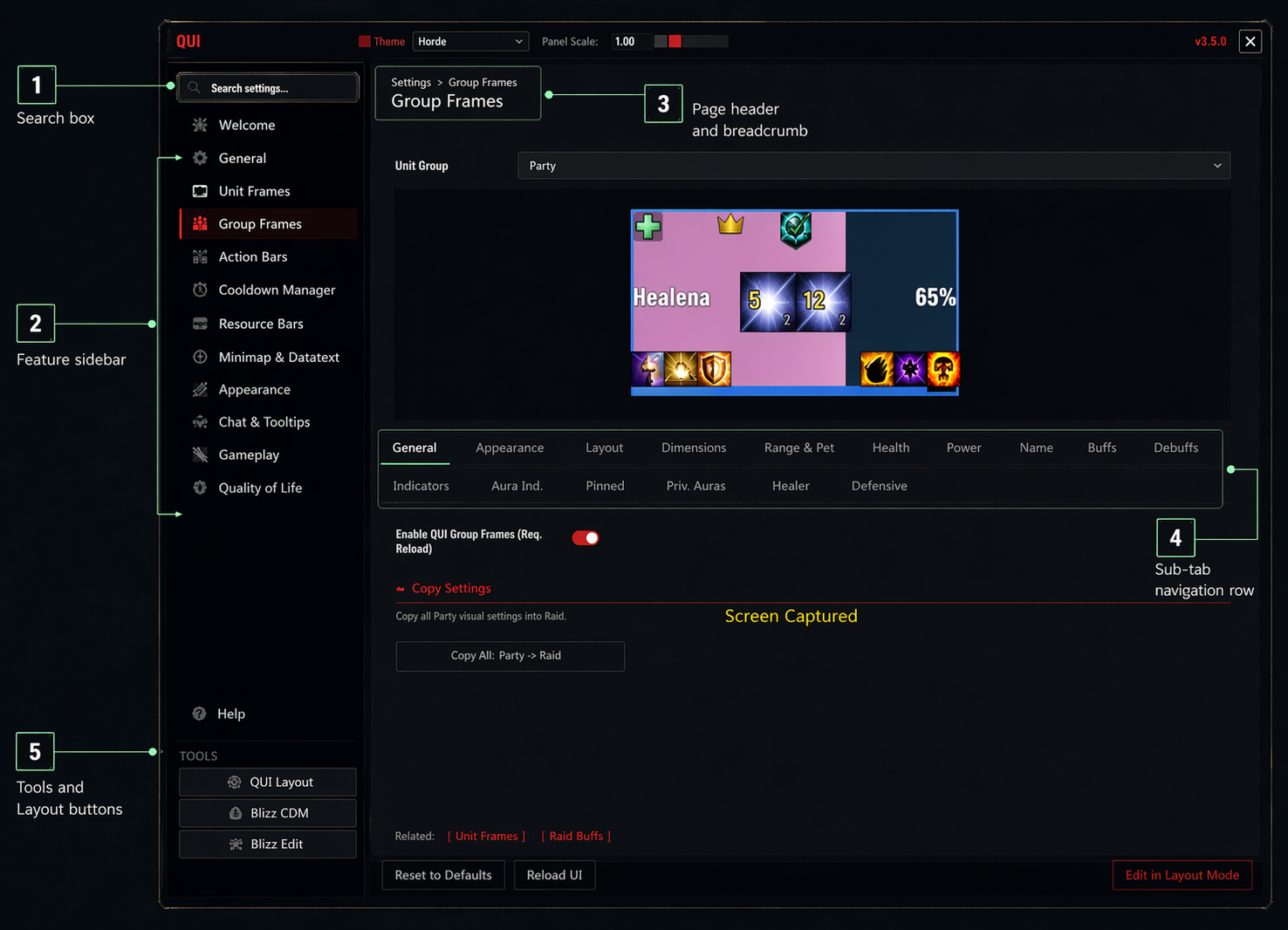 Actual QUI settings screen showing the main navigation areas.
What is QUI?
QUI is a full UI package for players who want combat information, layout controls, utility tools, inventory helpers, account tracking, and visual polish to live in one place. It brings together a custom combat HUD, modular feature addons, layout editing, minimap and action bar styling, group tools, chat, bags, data panels, quality-of-life automation, and profile management under one settings experience.
QUI’s interface is also localized into 11 languages and follows your WoW client language automatically. See Localization.
If you are new to QUI, the easiest way to think about it is this: install all QUI* folders, open /qui, choose which optional modules you want, then fine-tune the pieces you care about.
QUI is a multi-folder addon suite. Addon-manager installs handle this automatically. Manual installs must copy every top-level QUI* folder from the release zip into Interface\AddOns\, not only the QUI folder.
Why Players Pick QUI
- One suite, one design language for combat HUD, utility panels, skinning, chat, bags, and layout controls.
- Fast to set up with bundled imports, profile tools, and a dedicated Layout Mode.
- Easy to grow into whether you only want the essentials or plan to enable the newer optional modules.
- Built for real gameplay with strong support for dungeon, raid, healing, and general-use workflows.
Start Here
- Open the Getting Started guide.
- Follow the Installation steps.
- Run through the First Setup walkthrough.
- Review Module Addons so you know which beta modules are opt-in.
- Use Layout Mode to place your HUD where it feels natural.
- Browse the Features section to decide what you want QUI to handle for you.
What QUI Covers
Combat HUD
| Feature | Description |
|---|---|
| Cooldown Manager | Keeps your important abilities, buffs, and procs near the center of your screen so you can stop staring at your bars. |
| Unit Frames | Replaces your combat frames with cleaner, more configurable player, target, focus, pet, and boss frames. |
| Group Frames | Adds opt-in party and raid frames built for healing, support, and high-information group play. |
| Custom Trackers | Lets you build extra bars for trinkets, utility spells, consumables, or niche encounter tracking. |
| HUD Visibility | Controls when HUD elements appear, fade, or hide so your screen stays clean outside combat. |
| Damage Meter | Adds QUI-styled native damage meter windows with selectable views and layout controls. |
Action Bars & Interface
| Feature | Description |
|---|---|
| Action Bars | Cleans up your bars, supports mouseover fade, and makes keybinds and ability states easier to read. |
| Minimap & Data Panels | Gives you a polished minimap, optional button drawer, and compact information panels for everyday play. |
| Chat | Offers either styling for stock chat or the opt-in QUI Chat display with custom tabs, copy tools, and Combat Log support. |
| Tooltips | Restyles tooltips and adds extra context like IDs, rating, guild info, and smart hiding rules. |
| Skinning | Applies QUI’s look to many Blizzard windows so the whole UI feels cohesive. |
| Info Bar | Adds an optional top or bottom bar for datatext widgets, micro menu buttons, travel, and spec switching. |
| Bags | Adds optional bag, bank, Warband bank, guild bank, sorting, search, and item-count tools. |
Dungeon & Group Content
| Feature | Description |
|---|---|
| M+ Timer | Tracks timer pressure, deaths, and route progress in a cleaner format. |
| Party Keystones | Surfaces group key information without extra setup. |
| Battle Res Counter | Keeps your available battle resurrection charges visible. |
| Dungeon Teleport | Makes earned dungeon teleports faster to access. |
| Auto Combat Log | Handles logging automatically for players who review runs or report encounters. |
Character & Quality of Life
| Feature | Description |
|---|---|
| Character Pane | Adds more gear and stat context to your character and inspect windows. |
| Alts | Tracks account-wide characters, equipment, currencies, reputations, weeklies, professions, and item locations. |
| Blizzard Frame Mover | Lets you drag more default UI pieces without relying entirely on Edit Mode. |
| Quality of Life | Bundles helpful automation, reminders, and convenience tools that save clicks every session. |
| Skyriding | Improves Skyriding readability with a clearer vigor and speed display. |
| XP Tracker | Adds a lightweight XP bar for leveling and casual play. |
Layout & Configuration
| Feature | Description |
|---|---|
| Layout Mode | Gives you a visual editor for positioning and tuning major HUD elements without guesswork. |
| Frame Anchoring | Helps related elements move together so your HUD stays organized. |
| Keybinds & Integrations | Makes keybinding faster and improves how QUI works with compatible systems. |
| Localization | Translates QUI’s interface into 11 languages with CJK font rendering, following your WoW client language automatically. |
| Profiles | Lets you keep one setup, per-character setups, or per-spec setups without rebuilding from scratch. |
| Performance Monitor | Exposes memory and event information when you need to troubleshoot. |
Recommended First Pass
If you want a clean result quickly, start with these pages:
- First Setup for the 10-minute setup path.
- Module Addons before enabling beta modules like Bags, Info Bar, Alts, or QUI Chat.
- Cooldown Manager if you want the signature combat HUD.
- Frame Layout if you want to move, anchor, or refine your screen.
- Action Bars and Minimap & Data Panels for overall polish.
- Quality of Life for the everyday conveniences many players end up keeping on.
Documentation Sections
- Getting Started for installation, first login, profiles, slash commands, and troubleshooting.
- Features for plain-language walkthroughs of what each part of QUI does in play.
- Settings for the deeper, power-user reference pages that mirror the in-game options.
Community
- GitHub for releases, source, and issue tracking.
- Discord for setup help and community discussion.
- CurseForge for downloads and update tracking.
- Ko-fi to support ongoing maintenance.